Classic Menu for Office 2007, 2010, 2013 and Other Product Lines
- Classic Menu for Office 2010 and 2013 Suites
- Classic Menu for Office 2010 and 2013 Applications
- Classic Menu for Office 2007 Suites
- Classic Menu for Office 2007 Applications
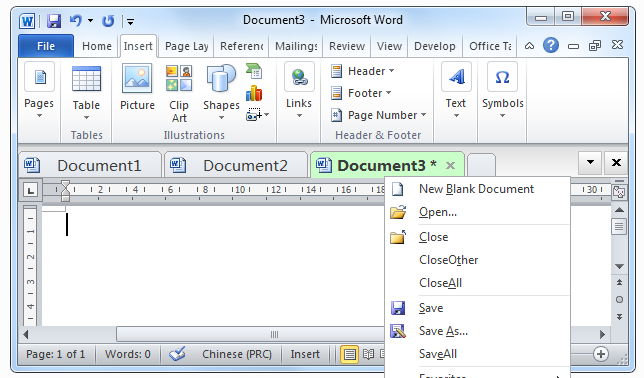
- Office Tab (Word Tab, Excel Tab...)
- Other Products (Ribbon Helper, Addintools Create...)
|
|||||
![]() |
Classic Menu for Office 2010 and 2013Includes: Classic Menu for Word, Excel, PowerPoint, OneNote, Outlook, Publisher, Access, InfoPath 2010 and 2013. |
||||
![]() |
Classic Menu for Office Enterprise 2010 and 2013Not only includes all applications of Classic Menu for Office 2010, also includes Classic Menu for Visio and Project 2010 and 2013. |
||||
![]() |
Classic Menu for Office Home and Business 2010 and 2013Includes: Classic Menu for Word, Excel, PowerPoint, OneNote, Outlook 2010 and 2013. |
||||
![]() |
Classic Menu for Office Home and Student 2010Classic Menu for Office Home and Student 2010 is Only Free for Personal Non-Commercial use. You must install one of the upon suites for commercial use.Includes: Classic Menu for Word, Excel, PowerPoint, OneNote 2010. |
||||
Classic Menu for Office 2010 and 2013 Applications |
|||||
Classic Menu for Access 2010 and 2013 |
|||||
Classic Menu for Excel 2010 and 2013 |
|||||
Classic Menu for InfoPath 2010 and 2013 |
|||||
Classic Menu for Outlook 2010 and 2013 |
|||||
Classic Menu for PowerPoint 2010 and 2013 |
|||||
Classic Menu for Project 2010 and 2013 |
|||||
Classic Menu for Publisher 2010 and 2013 |
|||||
Classic Menu for Visio 2010 and 2013 |
|||||
Classic Menu for Word 2010 and 2013 |
|||||
Classic Menus for Office 2007 Suites |
||
![]() |
Classic Menu for Office 2007Brings classic familiar menus and toolbars back to Microsoft Office 2007. It includes Classic Menu for Word, Excel, PowerPoint, Access and Outlook 2007. |
|
![]() |
Ribbon Customizer for Office 2007You can use this software to customize your ribbon in Office 2007. It contains the suite Classic Menu for Office 2007. The program requires more knowledge about ribbon of Microsoft Office, and fit for extend users. |
|
![]() |
Ribbon Helper for OfficeNo click, just move mouse over tabs to bring the Ribbon Tabs to front.No click, just move mouse over menus to drop down the Classic Menus. Even if the ribbon is minimized, the ribbon tabs can still be automatically activated and expanded. |
|
Classic Menus for Office 2007 Applications |
||
Classic Menu for Access 2007 |
||
Classic Menu for Excel 2007 |
||
Classic Menu for Outlook 2007 |
||
Classic Menu for PowerPoint 2007 |
||
Classic Menu for Word 2007 |
||
Other Products |
||
![]() |
Addintools Assist for ExcelIf you are working in the USA and a foreign customer sends you a document, there are a number of cells that contain date& time such as 2004-12-31, Excel (English edition) might not recognize it and will treat it as text. You will have to re-enter every date into Excel again. Addintools Assist could recognize these cells as dates and will convert them to the local date format of your computer. |
|
![]() |
Addintools Create for ExcelAddintools Create for Excel converts rows in Excel to Charts, Diagrams, AutoShapes, Drawings, WordArts, Reports, Tables, Cards, Labels, Forms and Sheets in just several minutes. Addintools Create for Excel will help you input complicated formulas into Diagrams, AutoShapes, WordArts, Drawings and other objects. |
|