


Show Classic Menus and Toolbars on Ribbon of Microsoft Word 2007
 |
Classic Menu for Word 2007
|
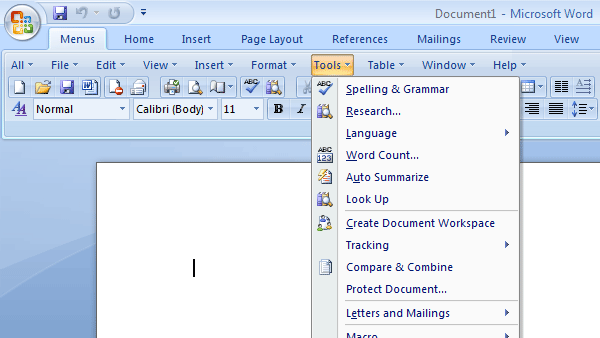
 Show classic view and old menu in Word 2007. Make Word 2007 look like 2003.
60-Day Money Back Guarantee.
Free updates (service packs, patches and higher versions of Classic Menu for Word 2007) and supports.
Easy to show or hide tabs of Ribbon.
Easy to show or hide the classic menus and toolbars.
Easy to install and uninstall.
Quickly find and execute the command that you want.
Small file size: only4.5 - 5.0 MB. so downloads happen very quickly.
Just press Alt-Q-Q, you can use the familiar keyboard shortcuts now.
Fast startup and use it immediately.
The Word 2007 icon ribbons will still be available at all times.
You don't need any training or tutorials for Microsoft Word 2007.
More Products
Classic Menu for Office 2007 (include Classic Menu for Access, Excel, Outlook, PowerPoint and Word 2007)
Classic Menu for Excel 2007
Classic Menu for Access 2007
Classic Menu for Outlook 2007
Classic Menu for PowerPoint 2007
Frequently Asked Questions
How to hide classic menus temporarily?
Is there a way I can use the keyboard shortcuts to access the classic menus?


*Microsoft and the Office logo are trademarks or registered trademarks of Microsoft Corporation in the United States and/or other countries.