


Show Classic Menus and Toolbars on Ribbon of PowerPoint 2010, 2013, 2016, 2019 and 365
 Classic Menu for PowerPoint


Have you tried the Microsoft® PowerPoint® 2010, 2013, 2016, 2019 or 365? If you have spent a lot of time adjusting yourself to the Ribbon interface of PowerPoint 2010/2013/2016/2019, or being frustrated by searches for new features on the Ribbon interface, here is a solution to save your time for the transition: Classic Menu for PowerPoint. All classic menu items of PowerPoint 2003/2002/2000 are well displayed as a group in the tool bar of the Ribbon, while all new features and commands of PowerPoint 2010, 2013, 2016, 2019 and 365 are added to the classic style interface.
No Tutorials or Training
Classic Menu for PowerPoint help you work with PowerPoint 2010/2013/2016/2019 as if it were PowerPoint 2003/2002/2000. It shows the familiar classic menus and toolbars on the ribbon in PowerPoint 2010, 2013, 2016, 2019 and 365. If you were using PowerPoint 2003/2002/2000 before, you don't need training or tutorials after upgrading to PowerPoint 2010, 2013, 2016, 2019 or 365 with this add-in now.
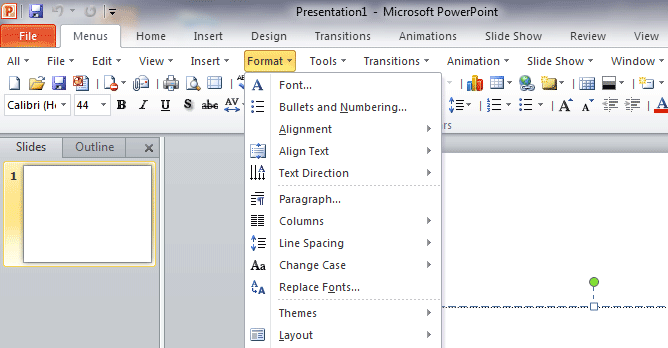
Classic menus and toolbars in PowerPoint 2010
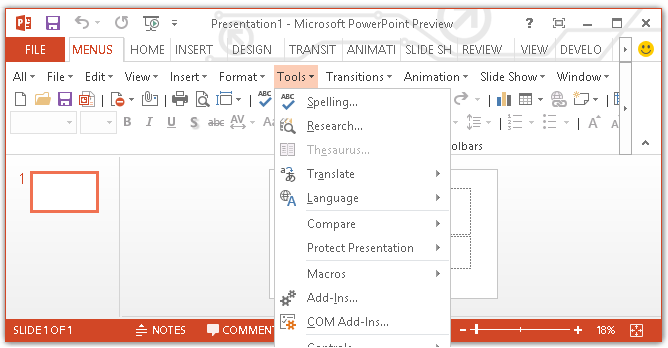
Classic menus and toolbars in PowerPoint 2013
More features:
- Fast download speed
- Easy install and uninstall
- Small file size: only12 - 14 MB
- Keyboard shortcuts are available
- Easy to show or hide the classic menus and toolbars
- Easy to show or hide tabs of Ribbon
- Various Display Position: The Menus tab could be showed on the left of Home tab, or showed as the last tab
- New Ribbon of PowerPoint 2010/2013/2016/2019 and old toolbars of PowerPoint 2003 are both available at all times
- Easy to execute the commands without any training or tutorials of PowerPoint 2010, 2013, 2016, 2019 and 365
- Fully compatible with Microsoft® Windows® 11/10/8/7/Vista (32/64), XP, Windows Server from 2003 to latest version (32/64), Windows Terminal (Remote Desktop) Server and Citrix System
PowerPoint 2010, 2013, 2016, 2019 and 365 menusClassic Menu for PowerPoint is able to recover old menus of PowerPoint 2003 in ribbon of PowerPoint 2010, 2013, 2016, 2019 and 365. It creates PowerPoint 2010/2013/2016/2019 menus and inserts it under Menus tab in Ribbon. The added PowerPoint 2010/2013/2016/2019 menus is similar with old menus of PowerPoint 2003. Exactly, the created PowerPoint 2010/2013/2016/2019 menus exceed those old menus in PowerPoint 2003. That's because the new PowerPoint 2010/2013/2016/2019 menus not only contains all old drop down menus and their sub-items of PowerPoint 2003, but also combines new features of PowerPoint 2010, 2013, 2016, 2019 and 365. |
PowerPoint 2010, 2013, 2016, 2019 and 365 toolbarsClassic Menu aims to help users work in Ribbon as if it were PowerPoint 2010/2013/2016/2019 classic view. Classic Menu for PowerPoint also brings back PowerPoint 2010, 2013, 2016, 2019 and 365 toolbars. The toolbars stays below menus, and the layout is same as those in PowerPoint 2003. |
Multiple languagesIt supports all languages that are supported by PowerPoint 2010/2013/2016/2019: English, French, German, Italian, Spanish, Portuguese, Japanese, Dutch, Danish, Arabic, Korean, Chinese, and more... |
Easily Download and InstallYou can free download Classic Menu for PowerPoint from our web site. It supports 15 days free trial. Download it less than 2 minutes, install it less than half a minute, and show the main menu and toolbars immediately. You can add the menus and toolbars to Quick Access Toolbar, and then you can minimize the Ribbon and finish all operations without Ribbon. |
New FeaturesAll those new features which are present in PowerPoint 2010, 2013, 2016, 2019 and 365 are included in a classic style interface of this software, expanded PowerPoint animation and transitions menu items. |
Easy OperationEasily enable or disable this PowerPoint add-in, and the Classic Menu Manage center can help you quickly configure the setting. |
100% Satisfaction GuaranteeWe provide with 60-day money back guarantee. No matter what the reason may be, if you are not satisfied with your purchase, we will refund your money in 60 days. |